Hiển thị các bài đăng có nhãn 3D Printing in Education. Hiển thị tất cả bài đăng

Thứ Bảy, 7 tháng 2, 2015

BPC Maker Club Shares our Makerspace at Cool Tools 2015!

Today, BPC Maker Club embarked on a different kind of presentation.  Different than the Maker Faire or Bay Area Science Festival, where we met with people of all ages, and different than the 3DPW Expo, where we were networking with companies, CUE Cool Tools 2015 was a workshop for teachers.

We highlighted a few of our maker projects in school.  You can see our presentation here:


Then allowed for lots of small-group, hands-on time for teachers to learn more about MaKey MaKeys, Scratch, Lilypad sewable electronics and 3D printing. 

(Students, add your reflections here)


"I agree!" - Ms. Mytko

Thứ Sáu, 6 tháng 2, 2015

Science Fair with 3D Printing and Augmented Reality!

It's about that time again.  This Thursday will be our school science fair.  Last year, I was so pleased to see 3D printing used as a tool in a number of the projects. Not because it was required, or a special 3D printing class, but because it was there and allowed students to create the objects they needed for a specific purpose.  This year is no different.

This year features:

1) Another 3D printed drone body.  Although, unlike last year's downloaded files, these parts were designed by 7th graders using TinkerCAD.  As an added bonus, the kids took advantage of their classmate's recent headway with ditto printing to speed the process along.

Perhaps equally impressive are the clamps one girl downloaded, printed and assembled for her use while building the drone.

making clamps


2) Pinhole camera (pic on its way!)

3) Hair straighteners - this was one of the more disturbing projects (visually!)  Using supposedly "real human hair" (from Amazon) this group was studying the effect of different straightening techniques on the strength of hair. They used heat, but also wanted to use magnetism and dry ice (hey, it's 7th grade), so they needed to custom design their own handles to hold the magnets and dry ice. For these ladies, it was their first time using TinkerCAD and the 3D printer.


4) Gliders - This group began by downloading files on Thingiverse to do some preliminary background research, but quickly moved to designing their own wings.  Starting off in TinkerCAD, they eventually decided to move to Fusion360.  The best part?  ONe boy taught HIMSELF how to use the 3D printer.  Because he could. :)


5) Insect maze (pic on its way!)

This year, we intend to include augmented reality into our traditional trifold boards, like last year. Unlike last year (when we had only heard of AR for the first time 10 days before the fair), we've had time to learn more about Aurasma in general and will be using Aurasma Studio, rather than the more expedient, but less flexible app method.

While we had hoped to master the process of creating 3D models (exusing Maya to incorporate into Aurasma (therefore allowing students to display v1 and v2, etc of their projects) we are happy to simply include student videos again.

We'll keep you posted!


Thứ Hai, 2 tháng 2, 2015

BPC at the 3D Printer World Expo

Here is a brief overview of our experience at 3DPW - more to be added soon, but homework and science fair is taking up most of our time right now!

This past weekend, the BPC Maker Club was excited to be part of 3D Printer World Expo in Burbank, CA.  3DPW is currently the only 3D printing conference in the country (world?) that allows kids under the age of 18.  

Last year, we were attendees (post 1post 2) and realized that there was a lot of talk about how 3D printing was being used with students... without the voices of any actual kids!  This summer we contacted Bob Tisch, one of the organizers of the conference, and he agreed to find space for our kids to share their work.  We were told that a seminar space would not work, since "one of the vendors" already had that claimed (more** on this later) so we were generously offered a booth space on the Expo floor - right next to many companies we know and admire.  It may have been way in the corner, but we were thrilled to even be on the map!  (See us there, in the upper left hand corner of the map?!)

BPC Maker Club at our 3DPW booth!


We left after lunch on Thursday and flew down to Burbank just in time for the opening reception. The 8th grade boys did enjoy the fancy, open buffet!

Friday morning, we were in the elevator, heading down to the Expo floor, when we ran into John Westrum, from Afinia**.  He was the vendor that was speaking at the seminar "Enhancing Education Curriculum Through 3D Printing."  John is somewhat familiar with our work, having run into Ms. Mytko at a number of previous conferences, and was very excited to see up there.  Then he very generously offered to shorten his presentation and give us half his time slot to speak at the seminar.  We were happy to oblige.


Jane during the Q & A at "Enhancing Education Curriculum Through 3D Printing"

Ms. Mytko describes our 8th grade 3D printing project
That afternoon, we also met a number of folks from 3DSystems / Gentle Giants Studio, located nearby in Burbank.  They called the studio and arranged a tour for us!

Action figures at Gentle Giants Studio

BPC kids hanging out with Jabba the Hutt at Gentle Giant Studio

The EPIC scanning studio - sweet!

(We were not allowed to take photos in the 3D printing room, but it was incredible.)


Chillin in the conference room at Gentle Giant Studio

We also met a teacher and STEAM coordinator, Markos, that offered to give us a tour of his makerspace.  He heard us speak at the seminar and said we are "where he was two years ago."  From the looks of his awesome space, we will take that as a compliment!


Some of us went to seminars occasionally, but mostly we hung out at our booth and talked... and talked.  And networked with big companies.  We will write more about our Expo floor adventures soon!


Thứ Bảy, 17 tháng 1, 2015

Our newest 3D Printing Club - Run by Students!

Our BPC Maker Club encourages students to join in the second trimester of 7th grade or later, (1) to keep it to a manageable size and (2) because it can be very frustrating to new students to work within the constraints and difficulties of maker club.  In the beginning of 7th grade, we do a lot of our engineering design work and you learn to deal with frustrations and work more independently.

To include some younger students, Sam, a fellow student, and I are running a 3D printing club, focused purely on the 3D printing aspect of our maker club. We teach a single 3D printing concept, from the 45 degree rule to exact measurements in TinkerCAD, every club meeting. We try to print everyone's models by the next club, and begin the next club with a discussion of what went wrong, and what went well.  (Here is an example of one week's lesson plan, although it doesn't make too much sense without the person explaining it.)


A few of the challenges we've run into so far include our hardware, in the form of Chromebooks, being less-than-perfect for the job at hand. Another is the problematic nature of TinkerCAD, and its tendency to crash at inopportune times. We haven't run into this problem yet, but we do have a back-up plan for when we do.

One of the biggest things that is going to have to change for 3D printing to be a feasible classroom technology is speed. Even for a club of 6, with 3 (active) teachers, Ms. Mytko on standby, and a once-a-week meet-up, printing these files sometimes is difficult. Each print is between 30 minutes and 1 hour long, and every print fail (~30-40% of them fail, because the 6th graders are relatively new to 3D modeling) adds significant time to the total print. Never mind the likelihood of both printer functioning at once. So teaching a 3D printing class to, say, 24 kids each printing a 20 minute file, which is a very small model, would take more than 11 hours of solid print time. Including time for transitions between prints, heating, and processing the files, that could be 15-17 hours.

15 hours of print item isn't really feasible for most classrooms. So many of us will be eagerly awaiting faster printers, and until then, trying to figure out a workflow that scales up more efficiently.


Thứ Bảy, 18 tháng 10, 2014

Tales of a 3D Printer Shout-Out! :)

So, I needed a link from our blog earlier today. When I googled it,  I was surprised to see this post appear in my search results.


Apparently, a blogger named Karie Huttner wrote a post about 3D Printing on discoveryeducation.com and had these three good lessons to share:

Lesson 1 – Consume to Create
Lesson 2 – Connect with your Community
Lesson 3 – Resources

Under resources, she writes, "You aren’t the first one to go down this path.  Tapping into resources like the Invent to Learn website resources will help immensely.  Connect with other educators.  Follow blogs like MakerHome and Tales of a 3D Printer… you just never know what you will learn."

Sweet! We're a resource!

Thứ Hai, 6 tháng 10, 2014

Finding our (Work)Flow

One of the things we constantly struggle with is prioritizing time on the printer. The kids are always in the room at recess, lunch, passing periods, even occasional weekends... trying to get prints started. We've tried (1) first-come-first-served, (2) Google Doc sign ups, (3) Hunger-Games-style (last kid standing uses the printer), (4) dry erase board sign up.... but nothing has stuck yet.  

Below is our newest attempt at managing the workflow on the printers. The idea is that when the printer is idle (which is getting rarer and rarer these days), the kids and/or I can grab a sheet and run a few prints. 

Does anyone have advice on a good system that works?


Chủ Nhật, 17 tháng 8, 2014

NASA, NIH, Smithsonian post free 3D files

NASA
US Government agencies such as NASA, The Smithsonian, and the NIH have started to create their own collections of 3D objects!

NASA's model collection is mostly contains models of their satellites however it also contains some of things like space suites, shuttles, and a martian crater. Unfortunately, most of these models are not printable. NASA has conveniently separated the printable models on this page.

The Smithsonian museum has also started uploading 3D models of items from their collection to their Smithonian X3D website. Though many of these models look amazing many also look unprintable so be warned before you try to print them.

The NIH has taken a different approach to 3D model collection by making a Thingiverse like website for medically accurate 3D models. As you might expect, many of these 3D models of proteins and cells are scientifically accurate but likely un-printable. (Especially on our classroom 3D printers.)

NIH
UPDATE 7/4/15:  There are more model repositories that have been brought to our attention.  Here is a running list:


-Abe (entering 8th grade)

Thứ Ba, 17 tháng 6, 2014

3D Printing is fun, but where is the curriculum?

3D printers seem to be popping up in schools all over, thanks in part to initiatives like Makerbot Academy.  However, not every teacher with a 3D printer in the classroom seems to know what to do with it.

UPDATE JULY 2014: Tinkerine U looks promising. You have to sign up but then presumably have access to their training guides, workshops, etc.

ORIGINAL POST: For a long time, the only curriculum I was aware of was SeeMeCNC's SeeMeEducate developed by a passionate high school teacher working with Orion's Delta Printers.  It is pretty cool, you can check it out here.

Since then, 3D Systems has gotten in the curricular resources game with Cubify Education, hoping to be your "one stop shop for tutorials, curriculum, projects and educational information, materials and resources."  While it seems to have a ways to go, there is some potential here if they can garner critical mass.

Makerbot is also sniffing around and looking to teachers to flesh out their educational resources network.

Then, SME (Formerly the Society of Manufacturing Engineers) and 3D Systems recently (6.11.14) announced their new M.Lab21 initiative.  Together, they hope to "bring school workshops into the 21st century with cutting-edge equipment."  3D Systems is providing materials for participating schools, which "feature the latest in 3D design and 3D printing technology, including the Sense 3D scanner, the Touch haptic and prosumer desktop 3D printers, in addition to a suite of Cubify 3D design software [including Sculpt, Invent, and Design."  By mid-summer 2014, the M.Lab21 project hopes to have secured eight industry advisers who can provide leadership and guidance though the development process.


Also launched recently, Printrbot Learn is another initiative sponsored by Printrbot and run by teachers.  They, too, need to build a community, but I really do believe Brook Drumm, founder, has his heart in the right place and has always been a supporter of getting 3D printing into the hands of kids.
We believe that learning should be hands on. We believe that kids should solve real problems using real tools. We believe every kid should be a designer, a maker and an inventor. We believe that kids should Learn by Making.
Headed by teachers, Josh Ajima and Clarence Fisher, Printrbot Learn intends to host tutorials and lesson plans (and contests!) for teachers to implement the technology in their classrooms.

And, of course, the first book has just been released, The Invent To Learn Guide to 3D Printing in the Classroom: Recipes for Success by David Thornburg (and more).  I just picked up a copy and look forward to reading it.

Here are some other resources you can check out if you are interested in learning more about how educators are already using 3D printing in their classrooms:


What are some of your favorite 3D printer curricular resources?

Thứ Bảy, 7 tháng 6, 2014

Impact of BPC in 3D: A 3D Printed Graduation Project

(NOTE: As teachers and parents know, the end of the school year is a very busy time.  Here is a snapshot and a more detailed post is forthcoming!)

This year we implemented our first grade-level wide 3D printing project.  Graduating 8th graders were asked to reflect on "What's something you will take from your time here at BPC with you for the rest of your life?"  In English class, students wrote reflective passages and in science, they created CAD models which were 3D printed and displayed at our graduation ceremonies.  


Student models included:  a guitar, a key, camp fire, piano keys, 3d printer in water (?),  hourglass, drama mask, 3D Printer (Cube), another key, an arrow pointing up, music notes, an anchor, a ring, a lock and key, a rock. 3D Printer (Makerbot), bamboo, laptop computer, chair, egg, boat, footprints, butterfly, tree coming out of a book, a heart book thing with rings, hourglass, rose, Inception spinning top, running man, cracked egg , skull, book, nubby pencil, tree, tongue, bench, brain, space ship and planet, speech bubble, lightning bolt, light bulb, megaphone, another megaphone, cloud, microphone, light bulb, another rose.

Here are just a few models with their respective writing pieces:


I choose the seat of shame/honor to represent my time at BPC. When I got to Ms. Mytko’s class in 7th Grade I was very disruptive and was quickly given a seat at the front of the class labeled the seat of shame. However, slowly and kind-of surely, my behavior started to improve. The seat of shame was no longer entirely necessary and had become something that I enjoyed. When I came back in 8th Grade Ms. Mytko asked me which seat I wanted and I responded by saying the seat of honor. I think that this is very representative of my change at BPC. When I came in I would often get thrown out of classes and was a pain to deal with. Now I can’t even remember the last time I was thrown out of a class and I think that most of my teachers like me at least a little bit. I’m proud of the change I have made in my time at BPC.


I chose to make a rose as my 3D model. The rose represents my growth as a person as a student at Black Pine Circle. During my three years at BPC I have learned new ways to ask questions and how to speak out during class. I have become more sure of myself as a student and a person. When I first started school at BPC I was pretty shy and quiet, but classes like drama and music helped me find my voice. I chose to use a rose to represent what I’ll take with me after graduation because when I go to high school, I will always take with me what I’ve learned at BPC. The leaves represent my friends and memories I’ll take with me when I leave. 


I chose a 3D printer to symbolize the many experiences, skills and memories I have taken with me from BPC. I chose a 3D printer because it has changed my life over the last three years. When I was in sixth grade, Ms. Mytko got her first 3D printer, an original Printrbot. My friends and I worked on it for almost a year after everyone else lost interest. Persisting on projects like that was one skill working with 3D printers helped me a lot with. Another instance that I may not have persisted in a few years ago but did was a time I designed an iPad stand and after many design, software and printing failures, it still hasn’t worked but I haven’t given up.*  Also 3D printing has given me many opportunities over the last year or so, like visiting 3D printing conferences and going to the 3D System’s monthly meetups in San Francisco. I have no idea what I would be doing now without 3D printing. 

*Revision June 2: Since writing this paragraph I have finished the iPad stand.


(flowers were a popular choice) :)

The day of the ceremony, we set up the models / writing samples near the entrance to the school yard. 


The prep (post in progress...)  

Printing 48 models under a very tight deadline gave me plenty of practice implementing Kacie Hultgren's design tips for 3D printing


Chủ Nhật, 27 tháng 4, 2014

Lesson Learned


Actually, two lessons. 

The first lesson:  The computer can't shut down while a print is running. So, if the settings on the computer go to sleep after, say, 1 hour, and the print runs for 2 hours, you'll end up with half a print. 

Lesson two: In a middle school classroom, the computer setting are not the only thing that shuts down the computer. Actually, there are 25 things. 24 of which are students. Someone shut the lid on the computer running our printer, so we ended up with half of a (very lengthy) print. The low-tech solution in the picture above works pretty well so far. 

By Jane (7th grade)

Thứ Bảy, 1 tháng 3, 2014

It's the little things that save your sanity

My homegrown makerspace has been a labor of love and has provided its own set of learning experiences.  I've found lots of advice about shopping around for furniture, bins, tools and supplies, but here are two items I also recommend, discovered out of sheer necessity.

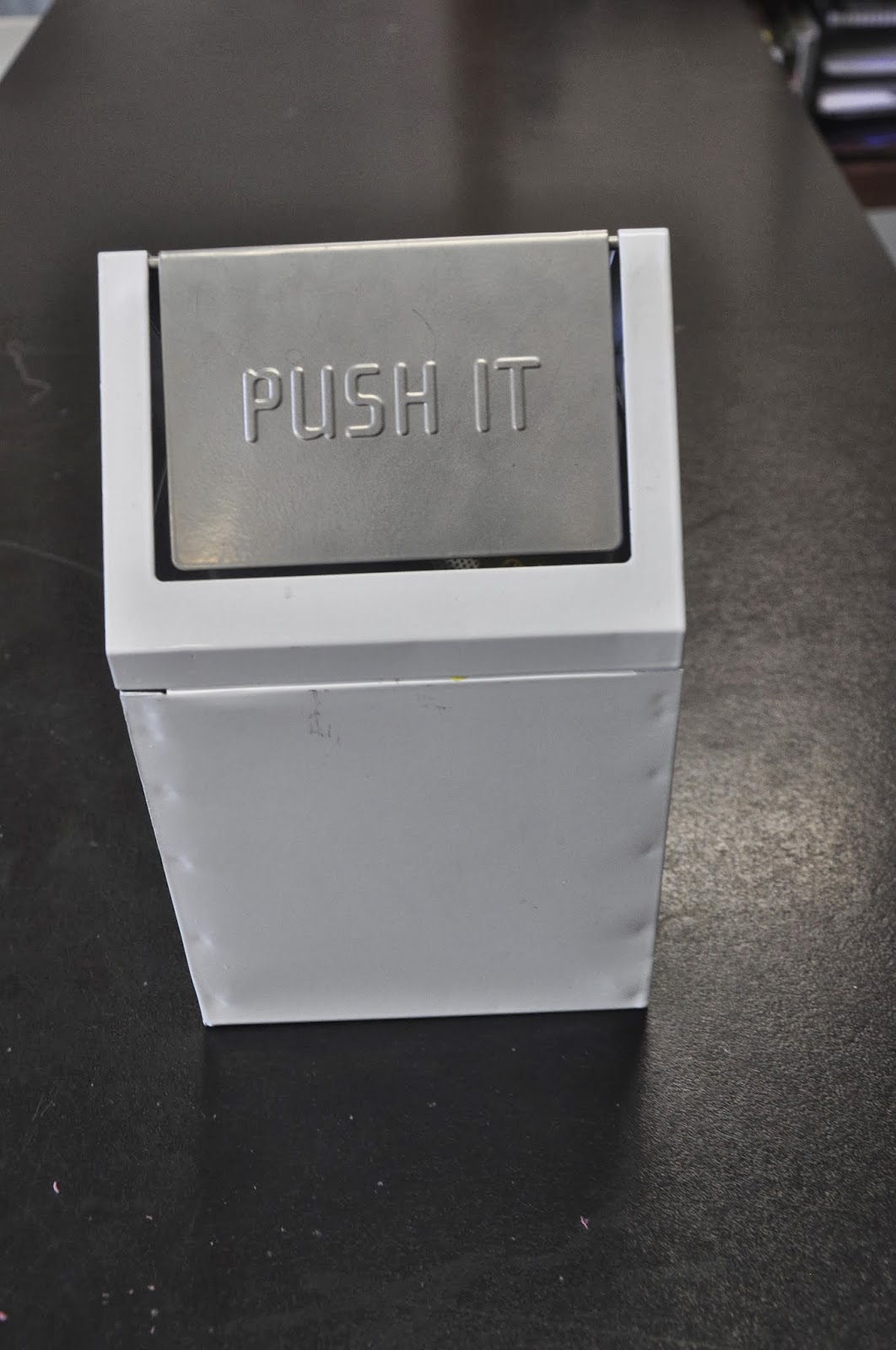
#1 - A small, "cute" tabletop garbage can.

With 3D printing, you will have little bits of extruded plastic EVERYWHERE.  My middle school students were notorious for leaving scraps laying around, or brushing them onto the floor. Enter one "cute" garbage can.  Now they can't wait to put their scraps in there, and they even like looking inside of it to see their collection of scraps and failed prints grow.  (I can't explain them, I just teach them.) :)  It's also easily portable, and we move it around the room as different tools and 3D printers fall in and out of favor with the group.  I bought this one at Target.


#2 - A 3D print display stand (ie: a non-slip spice rack)


The students in my science classes love to handle the 3D printed objects that are left behind in my room.  Often, science students will take a model to their desk and just enjoy having it sit there for the duration of the 50 minute class period.  However, the constant movement was a challenge.  I tried a spot on the table, ziploc bags, buckets and trays, but the models were all over the place.  Until I ordered the spice rack.  Still room for improvement, but it's better.  I plan to order a second one.  Of course you can build your own, but I (embarrassingly) was looking for a cheap, immediate, injection-molded solution.


PS: We also discovered that an O Organics animal cracker bin (Safeway brand) fits the Cube build plate perfectly to soak off the "Cubestick" glue!