Hiển thị các bài đăng có nhãn Android. Hiển thị tất cả bài đăng

Thứ Sáu, 28 tháng 10, 2016

Install ADB and Fastboot on Ubuntu

Fastboot is a tool that can be used to re-flash partitions on your Android device. Useful for the installation of new custom recovery (e.g. twrp) and operating systems like Cyanogenmod on preloaded Android. 


Installation of ADB and Fastboot
Open Terminal and apply following commands,

sudo su
apt-get install android-tools-adb android-tools-fastboot


Plugin mobile phone with PC and can apply various commands to manage your phone.

Fastboot commands

Check mobile phone recognised

fastboot devices

Reboot the device into fastboot

adb reboot bootloader

Flash recovery (e.g. twrp) onto your device
Place recovery image in home folder.

fastboot flash recovery recovery.img
 
Restart mobile

Thứ Hai, 23 tháng 11, 2015

Thứ Bảy, 30 tháng 5, 2015

Install ClockWorkMod (CWM) recovery in Android phone: an easy method

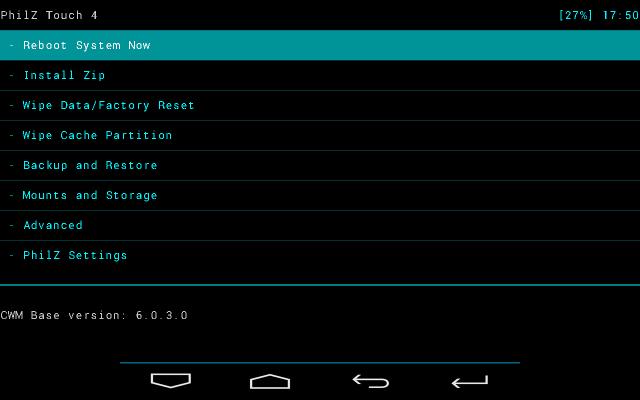
ClockWorkMod. Image courtesy: XDA Developers Forum
Recovery is a bootable partition of Android operating system and where lot of repairing tools available. We can compare recovery with BIOS in computer. ClockworkMod recovery is an alternative recovery for stock Android. It can give lot of options rather than stock Android recovery. 

Installation of CWM (ClockworkMod) recovery using other tools (e.g) ADB and Fast Boot tool) seems difficulty for new kids in Android arena. CWM allows backup and restore of stock ROM. Using CWM user can update/replace stock Android and install other custom ROM like Cyanogenmod.


Flashify is a user friendly application to assist in various recovery tools like CWM and TWRP. No need to apply various buttons and commands to install CWM recovery.

1. Root your phone using tools like King Root. You can't use  Flashify without rooting your device.King Root can unlock most of the phone. If King Root can't root your phone, find other methods. Make a search in Google and find alternative tools to root your phone.

2. Install Flashify from Google Play

3. Find and Download recovery image suitable with your phone. Make a search in Google to find apt recovery.img file for your Android phone. Save recovery.img file in your memory card of mobile.

4. Open Flashify application > Find Recovery Image


5. Find and Choose recovery.img from memory card.


6. Proceed with instructions. In the final, Flashify allow to reboot into recovery mode.

Thứ Năm, 7 tháng 5, 2015

Permission problems with Cyanogenmod default file manager

Cyanogenmod new users have reported that file manager shows following message whenever they try  to copy or move files to another location;

"This operation requires elevated permissions. Try changing to Root Access Mode"

Solution is that install another file manager. ES File Explorer File Manager is a good application to use instead of default file manager with Cyanogenmod.

In my experience ES File manager is very smooth. An inbuilt media player is available and users can play media files without leaving the file manager.

Thứ Ba, 21 tháng 10, 2014

Remove Micromax MAD application

MAD application available with Micromax is a disturbance while dialing numbers. In normal case, Micromax does not allow to uninstall MAD application. You can uninstall MAD application after rooting your phone using King Root.

First of all install King Root application.

Open King User application and goto KingTool > Uninstall Tool 
Find MAD app from the list and uninstall.


How to root Android Jelly Bean and Kit Kat using King Root

King Root is an ideal tool to root your Android phone. Download King Root .apk file from this link and install.

Run King Root application.

Click on Root button. It take sometime for the rooting process.


A blue bar appear after finishing the process. Click on blue button.
Restart phone. 

Caution:  This application may not work with all phone brands. You can try various tools like Framaroot and KingoRoot. If these tools does not work with your phone model, search in google to get a solution. Most of the phones have already rooted and you can find detailed documentation with the help of google.

Thứ Sáu, 24 tháng 8, 2012